End-to-End Linear Regression Project
California Housing Prices: from raw data → model → mini “deployment”.
Goal:
Build a complete regression pipeline on a real-world dataset:
- Load and inspect a real housing dataset (California census tracts).
- Perform EDA: distributions, correlations, feature–target relationships.
- Do basic preprocessing and train–validation splitting.
- Train and compare several linear models (OLS, Ridge, Lasso).
- Evaluate with MSE / MAE / R², plus visual diagnostics.
- Wrap the best model into a tiny prediction function as a mini “deployment”.
This project glues together ideas from:
- Probability & statistics (noise, variance, metrics)
- Linear algebra & gradient-based optimization
- Basic ML (regression, regularization, model selection)
Code:
import numpy as np
import pandas as pd
import matplotlib.pyplot as plt
import seaborn as sns

from sklearn.datasets import fetch_california_housing
from sklearn.model_selection import train_test_split, cross_val_score
from sklearn.preprocessing import StandardScaler, PolynomialFeatures
from sklearn.pipeline import Pipeline
from sklearn.linear_model import LinearRegression, Ridge, Lasso
from sklearn.metrics import mean_squared_error, mean_absolute_error, r2_score

# Reproducibility
RANDOM_STATE = 42
np.random.seed(RANDOM_STATE)

plt.style.use("seaborn-v0_8-whitegrid")
plt.rcParams["figure.figsize"] = (6.4, 3.8)
plt.rcParams["axes.titlesize"] = 12
1. Dataset & Problem Statement
We’ll use California housing data:
- Each row = a census block group in California.
- Features (per block): median income, house age, average rooms, population, latitude/longitude, etc.
- Target:
MedHouseVal— median house value (in $100,000s).
Task:
Given block-level features, predict the median house value.
This is a tabular regression problem, very typical in applied ML.
Code:
# Load into DataFrame
cal = fetch_california_housing(as_frame=True)
df = cal.frame.copy()

print("Shape:", df.shape)
df.head()
Output:
Shape: (20640, 9)
| MedInc | HouseAge | AveRooms | AveBedrms | Population | AveOccup | Latitude | Longitude | MedHouseVal | |
|---|---|---|---|---|---|---|---|---|---|
| 0 | 8.3252 | 41.0 | 6.984127 | 1.023810 | 322.0 | 2.555556 | 37.88 | -122.23 | 4.526 |
| 1 | 8.3014 | 21.0 | 6.238137 | 0.971880 | 2401.0 | 2.109842 | 37.86 | -122.22 | 3.585 |
| 2 | 7.2574 | 52.0 | 8.288136 | 1.073446 | 496.0 | 2.802260 | 37.85 | -122.24 | 3.521 |
| 3 | 5.6431 | 52.0 | 5.817352 | 1.073059 | 558.0 | 2.547945 | 37.85 | -122.25 | 3.413 |
| 4 | 3.8462 | 52.0 | 6.281853 | 1.081081 | 565.0 | 2.181467 | 37.85 | -122.25 | 3.422 |
Code:
df.info()
Output:
<class 'pandas.core.frame.DataFrame'>
RangeIndex: 20640 entries, 0 to 20639
Data columns (total 9 columns):
 #   Column       Non-Null Count  Dtype
---  ------       --------------  -----
 0   MedInc       20640 non-null  float64
 1   HouseAge     20640 non-null  float64
 2   AveRooms     20640 non-null  float64
 3   AveBedrms    20640 non-null  float64
 4   Population   20640 non-null  float64
 5   AveOccup     20640 non-null  float64
 6   Latitude     20640 non-null  float64
 7   Longitude    20640 non-null  float64
 8   MedHouseVal  20640 non-null  float64
dtypes: float64(9)
memory usage: 1.4 MB
2. Exploratory Data Analysis (EDA)
Questions we’ll quickly explore:
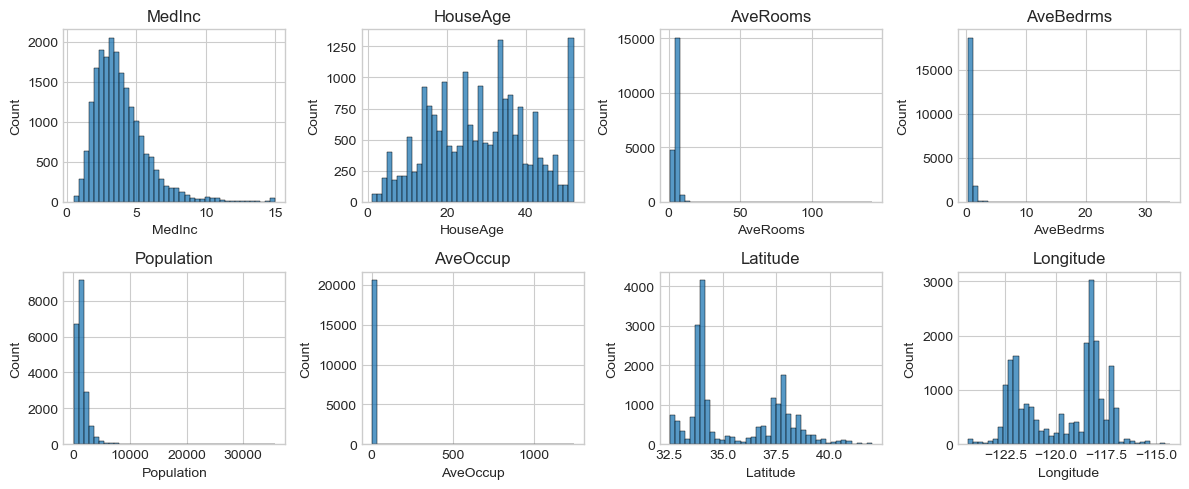
- What are the ranges and scales of each feature?
- Are there obvious outliers or heavy skew?
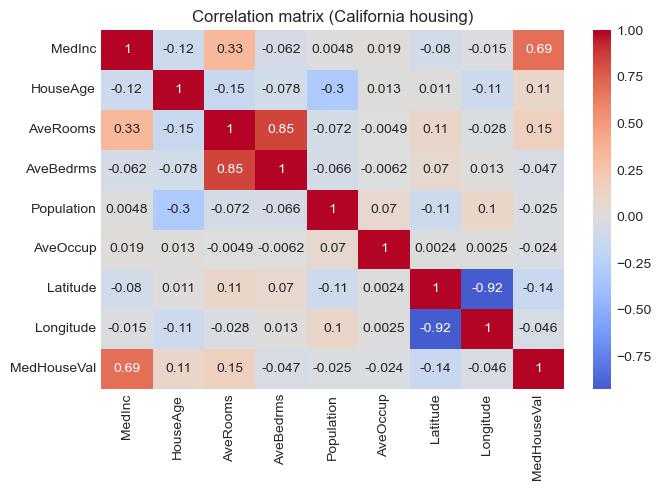
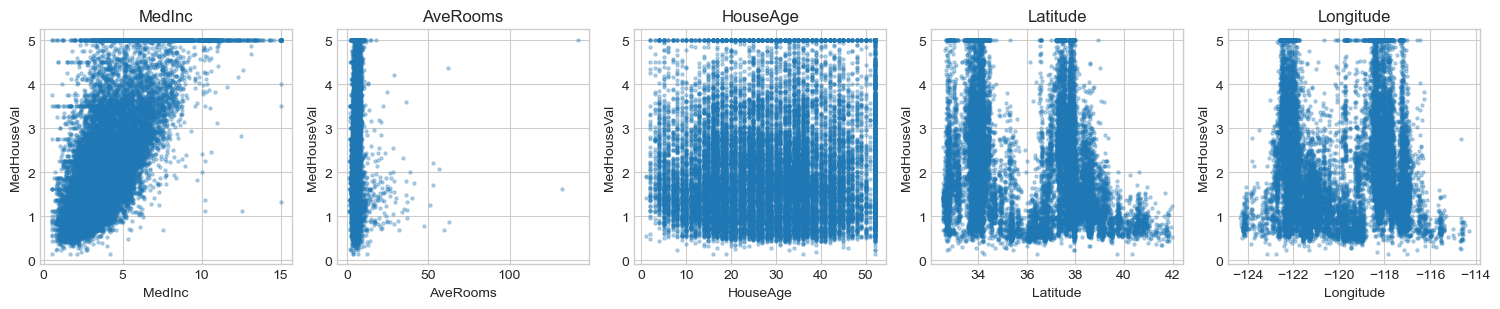
- Which features correlate most with house value?
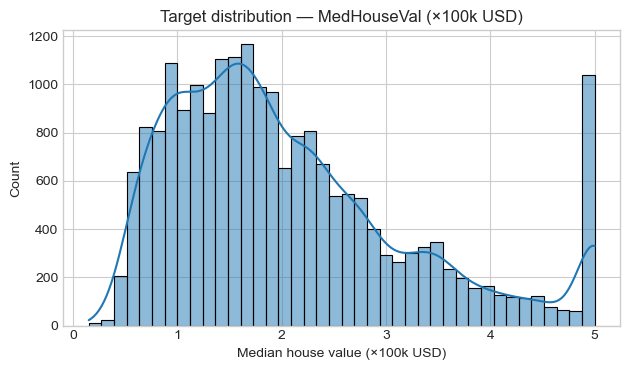
- How does the target distribution look?
This guides preprocessing (e.g., scaling, transforms) and model choice.
Code:
# Descriptive Stats & Target Distribution
df.describe().T
Output:
| count | mean | std | min | 25% | 50% | 75% | max | |
|---|---|---|---|---|---|---|---|---|
| MedInc | 20640.0 | 3.870671 | 1.899822 | 0.499900 | 2.563400 | 3.534800 | 4.743250 | 15.000100 |
| HouseAge | 20640.0 | 28.639486 | 12.585558 | 1.000000 | 18.000000 | 29.000000 | 37.000000 | 52.000000 |
| AveRooms | 20640.0 | 5.429000 | 2.474173 | 0.846154 | 4.440716 | 5.229129 | 6.052381 | 141.909091 |
| AveBedrms | 20640.0 | 1.096675 | 0.473911 | 0.333333 | 1.006079 | 1.048780 | 1.099526 | 34.066667 |
| Population | 20640.0 | 1425.476744 | 1132.462122 | 3.000000 | 787.000000 | 1166.000000 | 1725.000000 | 35682.000000 |
| AveOccup | 20640.0 | 3.070655 | 10.386050 | 0.692308 | 2.429741 | 2.818116 | 3.282261 | 1243.333333 |
| Latitude | 20640.0 | 35.631861 | 2.135952 | 32.540000 | 33.930000 | 34.260000 | 37.710000 | 41.950000 |
| Longitude | 20640.0 | -119.569704 | 2.003532 | -124.350000 | -121.800000 | -118.490000 | -118.010000 | -114.310000 |
| MedHouseVal | 20640.0 | 2.068558 | 1.153956 | 0.149990 | 1.196000 | 1.797000 | 2.647250 | 5.000010 |
Code:
# Target Histogram
plt.figure()
sns.histplot(df["MedHouseVal"], kde=True, bins=40)
plt.title("Target distribution — MedHouseVal (×100k USD)")
plt.xlabel("Median house value (×100k USD)")
plt.tight_layout()
plt.show()
Code:
# Feature Histograms
fig, axes = plt.subplots(2, 4, figsize=(12, 5))
axes = axes.ravel()

for col, ax in zip(df.columns[:-1], axes): # all features except target
    sns.histplot(df[col], bins=40, ax=ax)
    ax.set_title(col)

plt.tight_layout()
plt.show()
Code:
# Correlation with target
corr = df.corr(numeric_only=True)
corr["MedHouseVal"].sort_values(ascending=False)
Output:
MedHouseVal    1.000000
MedInc         0.688075
AveRooms       0.151948
HouseAge       0.105623
AveOccup      -0.023737
Population    -0.024650
Longitude     -0.045967
AveBedrms     -0.046701
Latitude      -0.144160
Name: MedHouseVal, dtype: float64
Code:
# Correlation Heatmap
plt.figure(figsize=(7, 5))
sns.heatmap(corr, cmap="coolwarm", center=0, annot=True)
plt.title("Correlation matrix (California housing)")
plt.tight_layout()
plt.show()
Code:
# Key Feature vs Target Scatter
key_features = ["MedInc", "AveRooms", "HouseAge", "Latitude", "Longitude"]

fig, axes = plt.subplots(1, len(key_features), figsize=(3*len(key_features), 3.2))
for col, ax in zip(key_features, axes):
    ax.scatter(df[col], df["MedHouseVal"], s=5, alpha=0.3)
    ax.set_xlabel(col)
    ax.set_ylabel("MedHouseVal")
    ax.set_title(col)

plt.tight_layout()
plt.show()
3. Train/Validation Split & Baseline
We’ll:
- Split data into train and test sets (80/20).
- Build a naive baseline that always predicts the training mean of the target.
- Compare all later models against this baseline using:
- MSE (Mean Squared Error)
- MAE (Mean Absolute Error)
- R² (coefficient of determination)
Code:
X = df.drop(columns=["MedHouseVal"])
y = df["MedHouseVal"].values

X_train, X_test, y_train, y_test = train_test_split(
    X, y, test_size=0.2, random_state=RANDOM_STATE
)

print("Train shape:", X_train.shape, "Test shape:", X_test.shape)

# Baseline: predict training mean
baseline_pred = np.full_like(y_test, fill_value=y_train.mean(), dtype=float)

def metrics_dict(y_true, y_pred):
    return {
        "MSE": mean_squared_error(y_true, y_pred),
        "MAE": mean_absolute_error(y_true, y_pred),
        "R2":  r2_score(y_true, y_pred),
    }

print("Baseline metrics:", {k: round(v, 3) for k, v in metrics_dict(y_test, baseline_pred).items()})
Output:
Train shape: (16512, 8) Test shape: (4128, 8)
Baseline metrics: {'MSE': 1.311, 'MAE': 0.906, 'R2': -0.0}
4. Preprocessing & Linear Models
We’ll build three linear models wrapped in Pipelines:
- OLS —
LinearRegressionwith feature standardization. - Ridge — L2-regularized regression (controls weight magnitude).
- Lasso — L1-regularized regression (encourages sparsity).
All preprocessing (here, StandardScaler) happens inside the pipeline to avoid data leakage.
Code:
models = {
    "OLS": Pipeline([
        ("scaler", StandardScaler()),
        ("reg", LinearRegression())
    ]),
    "Ridge(α=1.0)": Pipeline([
        ("scaler", StandardScaler()),
        ("reg", Ridge(alpha=1.0, random_state=RANDOM_STATE))
    ]),
    "Lasso(α=0.001)": Pipeline([
        ("scaler", StandardScaler()),
        ("reg", Lasso(alpha=0.001, random_state=RANDOM_STATE, max_iter=10_000))
    ]),
}

results = []

for name, pipe in models.items():
    pipe.fit(X_train, y_train)
    y_pred = pipe.predict(X_test)
    m = metrics_dict(y_test, y_pred)
    m = {k: round(v, 4) for k, v in m.items()}
    m["Model"] = name
    results.append(m)

results_df = pd.DataFrame(results).set_index("Model").sort_values("R2", ascending=False)
results_df
Output:
| MSE | MAE | R2 | |
|---|---|---|---|
| Model | |||
| Lasso(α=0.001) | 0.5545 | 0.5331 | 0.5769 |
| OLS | 0.5559 | 0.5332 | 0.5758 |
| Ridge(α=1.0) | 0.5559 | 0.5332 | 0.5758 |
Code:
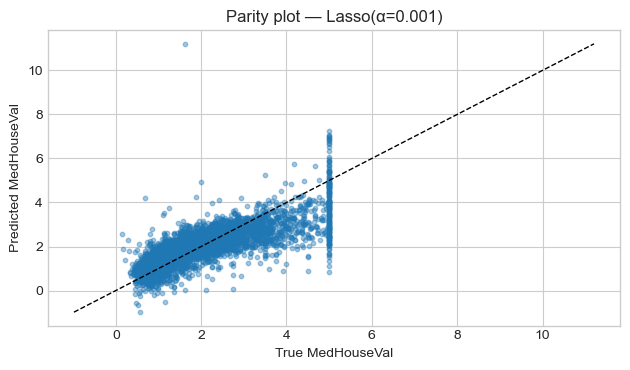
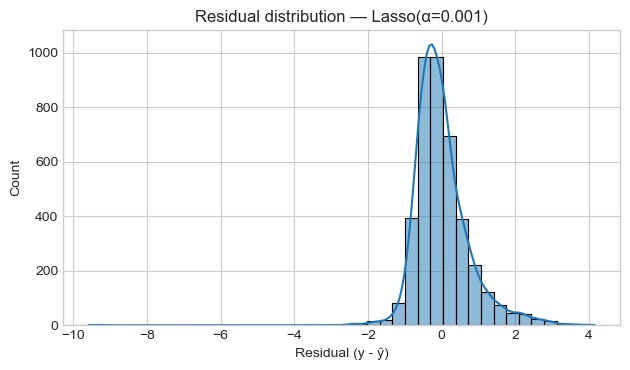
# Pick Best Model & Diagnostics
best_name = results_df["R2"].idxmax()
best_pipeline = models[best_name]
print(f"Best model by R² on test set: {best_name}")
print(results_df.loc[best_name])

# Predictions from best model
y_pred_best = best_pipeline.predict(X_test)

# Parity plot: y_true vs y_pred
plt.figure()
plt.scatter(y_test, y_pred_best, s=10, alpha=0.4)
lims = [min(y_test.min(), y_pred_best.min()), max(y_test.max(), y_pred_best.max())]
plt.plot(lims, lims, "k--", linewidth=1)
plt.title(f"Parity plot — {best_name}")
plt.xlabel("True MedHouseVal")
plt.ylabel("Predicted MedHouseVal")
plt.tight_layout()
plt.show()

# Residual histogram
residuals = y_test - y_pred_best
plt.figure()
sns.histplot(residuals, bins=40, kde=True)
plt.title(f"Residual distribution — {best_name}")
plt.xlabel("Residual (y - ŷ)")
plt.tight_layout()
plt.show()
Output:
Best model by R² on test set: Lasso(α=0.001)
MSE    0.5545
MAE    0.5331
R2     0.5769
Name: Lasso(α=0.001), dtype: float64
5. Cross-Validation & Hyperparameters (Ridge)
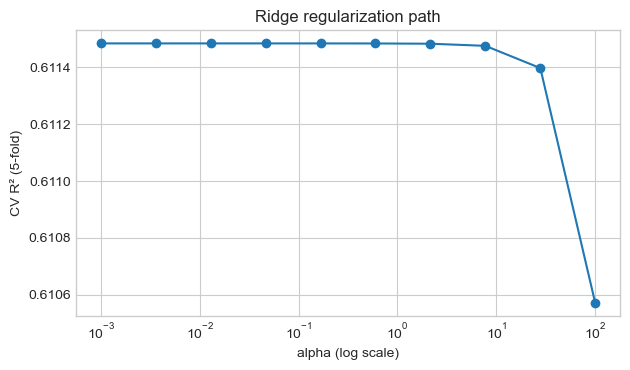
We’ll tune the Ridge regularization strength $\alpha$ using cross-validation on the training set.
- Small $\alpha$: low regularization, risk of overfitting.
- Large $\alpha$: stronger shrinkage, may underfit.
We’ll:
- Try a grid of $\alpha$ values.
- Compute 5-fold CV $R^2$ for each.
- Pick the best $\alpha$ and compare against our previous best model.
Code:
alphas = np.logspace(-3, 2, 10)
cv_scores = []

for a in alphas:
    ridge_pipe = Pipeline([
        ("scaler", StandardScaler()),
        ("reg", Ridge(alpha=a, random_state=RANDOM_STATE))
    ])
    scores = cross_val_score(
        ridge_pipe, X_train, y_train, cv=5,
        scoring="r2", n_jobs=-1
    )
    cv_scores.append(scores.mean())

cv_scores = np.array(cv_scores)

best_alpha = float(alphas[cv_scores.argmax()])
print("Best alpha by CV:", best_alpha)
print("Best mean CV R²:", round(cv_scores.max(), 4))

plt.figure()
plt.semilogx(alphas, cv_scores, marker="o")
plt.xlabel("alpha (log scale)")
plt.ylabel("CV R² (5-fold)")
plt.title("Ridge regularization path")
plt.tight_layout()
plt.show()
Output:
Best alpha by CV: 0.001
Best mean CV R²: 0.6115
Code:
# Train Final Ridge & Compare
ridge_best = Pipeline([
    ("scaler", StandardScaler()),
    ("reg", Ridge(alpha=best_alpha, random_state=RANDOM_STATE))
])
ridge_best.fit(X_train, y_train)
y_pred_ridge_best = ridge_best.predict(X_test)
metrics_ridge_best = {k: round(v, 4) for k, v in metrics_dict(y_test, y_pred_ridge_best).items()}
metrics_ridge_best
Output:
{'MSE': 0.5559, 'MAE': 0.5332, 'R2': 0.5758}
6. Tiny “Deployment” — Prediction Helper
In a real project, the trained pipeline would be:
- Saved to disk (e.g.,
joblib.dump) - Loaded inside an API server (FastAPI / Flask) or a batch script
- Used to serve predictions for new data
Here, we’ll simulate a single prediction function:
- Train the chosen model on all data (train + test).
- Define
predict_median_value(features_dict)that takes a Pythondictand returns a prediction. - Try it on a realistic example (e.g., middle-income block near the coast).
Code:
deployed_model = ridge_best

# Fit on full dataset
deployed_model.fit(X, y)

feature_names = list(X.columns)
print("Features:", feature_names)

def predict_median_value(features):
    """
    features: dict mapping feature name -> value
              any missing feature will be filled with dataset median.
    returns: predicted median house value in 100k USD.
    """
    x = df[feature_names].median().to_dict() # start from medians
    x.update(features) # override with user values
    x_df = pd.DataFrame([x], columns=feature_names)
    pred = deployed_model.predict(x_df)[0]
    return float(pred)

# Example: relatively high-income coastal block
example_features = {
    "MedInc": 6.0, # median income (~$60k)
    "HouseAge": 20.0,
    "AveRooms": 5.5,
    "AveBedrms": 1.0,
    "Population": 800.0,
    "AveOccup": 2.5,
    "Latitude": 34.0, # SoCal-ish
    "Longitude": -118.3, # near LA
}

pred_val = predict_median_value(example_features)
print(f"Predicted median house value: {pred_val:.3f} × 100k USD (~${pred_val*100_000:,.0f})")
Output:
Features: ['MedInc', 'HouseAge', 'AveRooms', 'AveBedrms', 'Population', 'AveOccup', 'Latitude', 'Longitude']
Predicted median house value: 2.987 × 100k USD (~$298,739)
7. Project Summary & Next Steps
- Loaded and explored the California housing dataset (real census data).
- Performed EDA: distributions, correlations, and key feature–target plots.
- Built a train/test split and a mean baseline for comparison.
- Trained and evaluated OLS, Ridge, and Lasso models with proper scaling.
- Used Ridge + cross-validation to choose a regularization strength.
- Wrapped the final model into a small prediction helper, mimicking deployment.
This project solidifies:
- How linear regression behaves on real, noisy data.
- How to structure an end-to-end ML workflow (EDA → preprocessing → modeling → evaluation → deployment sketch).
Next: Build
10_cnn_image_classification_project.ipynbfor a vision-based classification task. Then move on toPhase 1 — Fundamentals(MDPs, Bellman equations, DP, Monte Carlo, TD).